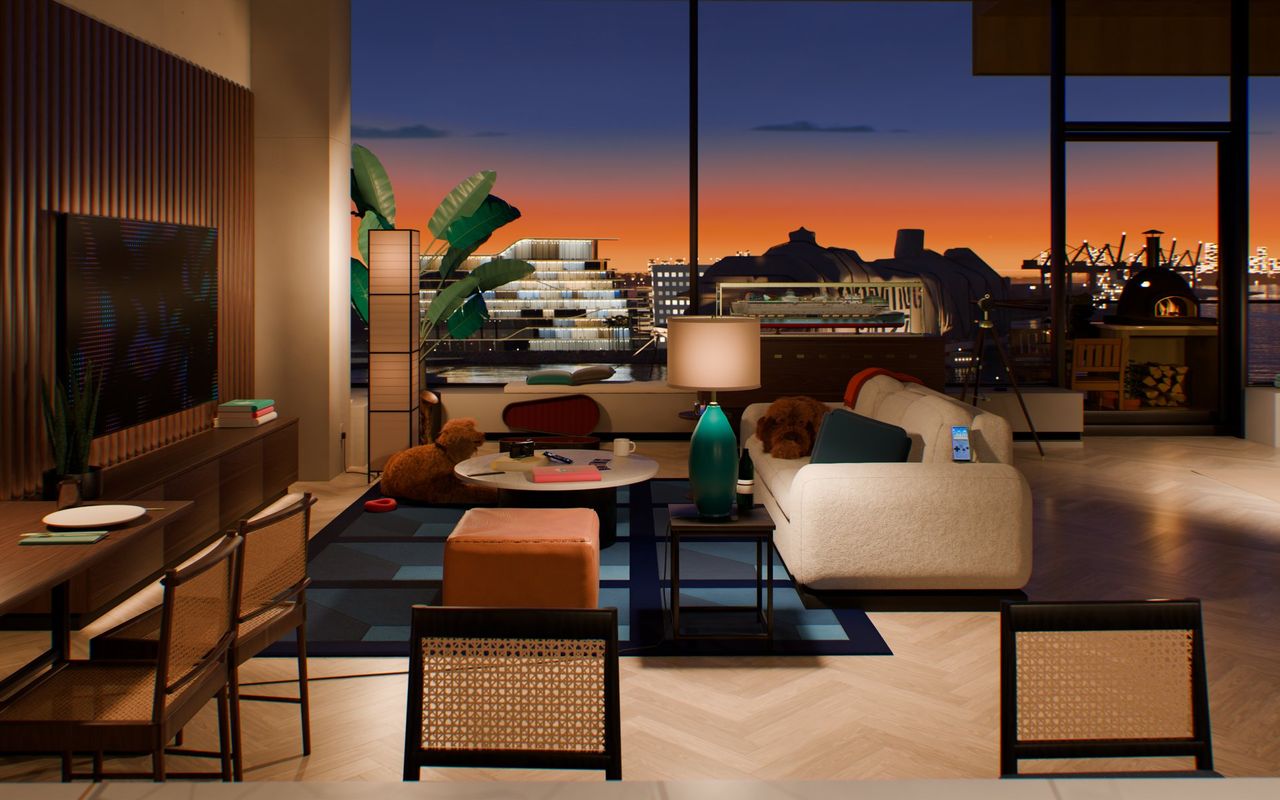
A photoreal loft written in Python
In this note
Early in planning Home Port, I stopped looking at layout wireframes and asked the question I was actually curious about:
"how do people like Felix get such realism and accuracy in their designs? it's almost atmospheric and that we are in the same place in reality? what tools do professionals use to achieve photo realism"
I was thinking of Felix Rieseberg's 1990s room and his generous making-of writeup, Made by mechanical means, right alongside Bruno Simon's classic WebGL truck. Watching how warm desk-lamp light bounced across Felix's room convinced me flat portfolio cards weren't going to cut it.
The catch was where real people would open mine. Most visitors tap a portfolio link inside LinkedIn's in-app mobile browser on spotty cell data. Standard web advice says that if you want a 3D room to survive on a phone, you strip down the geometry, flatten the ceiling, and bake cheap textures until a mobile GPU can draw sixty frames a second. I went the stubborn route instead: "we are going for photorealism, i don't care about optimizing for phones by making the ceiling plain".
Insisting on both halves at once, full Cycles path-traced materials and a first paint on a phone under a quarter of a megabyte, drove every engineering choice in the room.
Blender with zero GUI
Nobody ever opened Blender's desktop window on this project. Not once.
Every cloud builder session ran inside a headless 4-core Linux box with no GPU and Blender installed straight from Python (pip install bpy). A quick 640 x 480 path-traced test frame finished in about twelve seconds on raw CPU, which was plenty fast to iterate.
Because binary .blend files turn into unmergeable black boxes the instant two coding agents touch them, the entire loft is pure Python code. One master scene.py script constructs the room from scratch by calling nine modular scripts: architectural shell, living room, kitchen and workbench, the twelve hero props, plants, lamps, PortMiami harbor outside, procedural and CC0 materials, and the camera rig. All nine read a single shared coordinate plan.
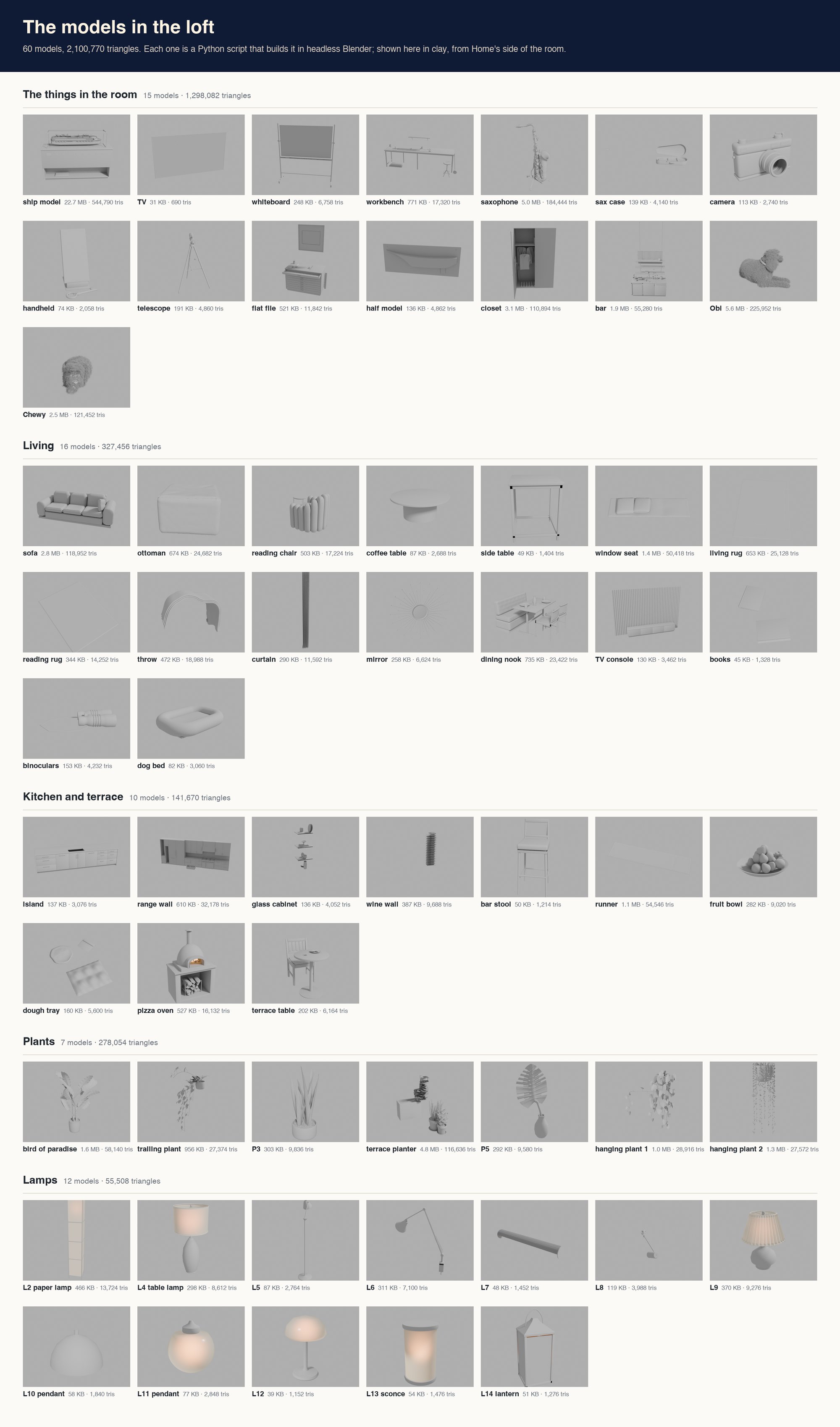
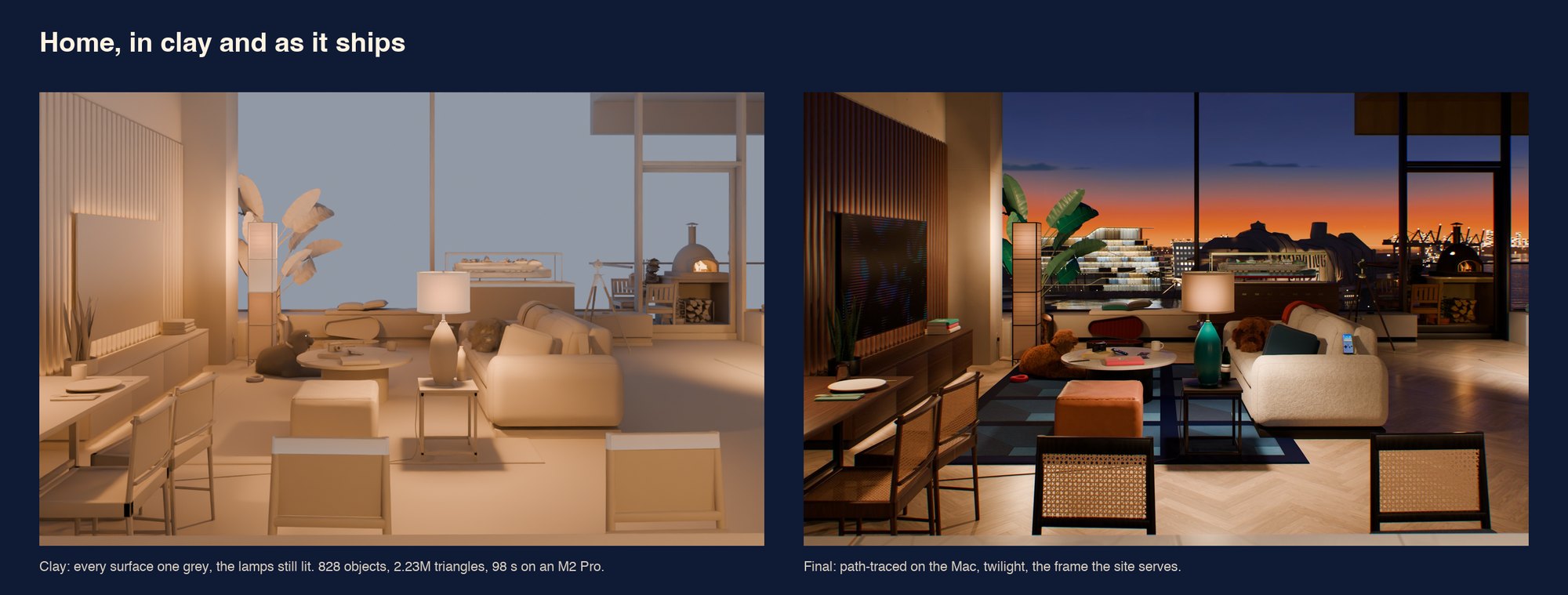
Building the entire room from code and rendering a clay pass is a single terminal command:
$ python -B scene.py -- full K_wide:1440:900:64:clay.png --clay --stats
STATS triangles 2226784 by module {"room5_shell": 22402, "room5_living": 361726,
  "room5_kitchen_work": 170344, "room5_objects": 1294280, "room5_plants": 278542, ...}
BUILD_SECONDS 59.4 objects 828
RENDER K_wide 1440x900 64 spp clay: 98.5 s
More than half of those 2.23 million triangles live inside the twelve hero props, and roughly 545,000 sit on the glass-cased cruise ship model alone. Cruise ships have an absurd number of tiny balconies.
Treating Miami Harbor like a movie backdrop
Our first harbor pass used faithful real-world map distances out the window toward PortMiami. Technically, the math was honest. Visually, on a phone screen, the ships and terminals looked like distant ants across a wide gray bay.
I pinch-zoomed the preview on my phone and asked: "does it need to be so true to life? could we move the entire port island closer to the window as well because it looks tiny?"
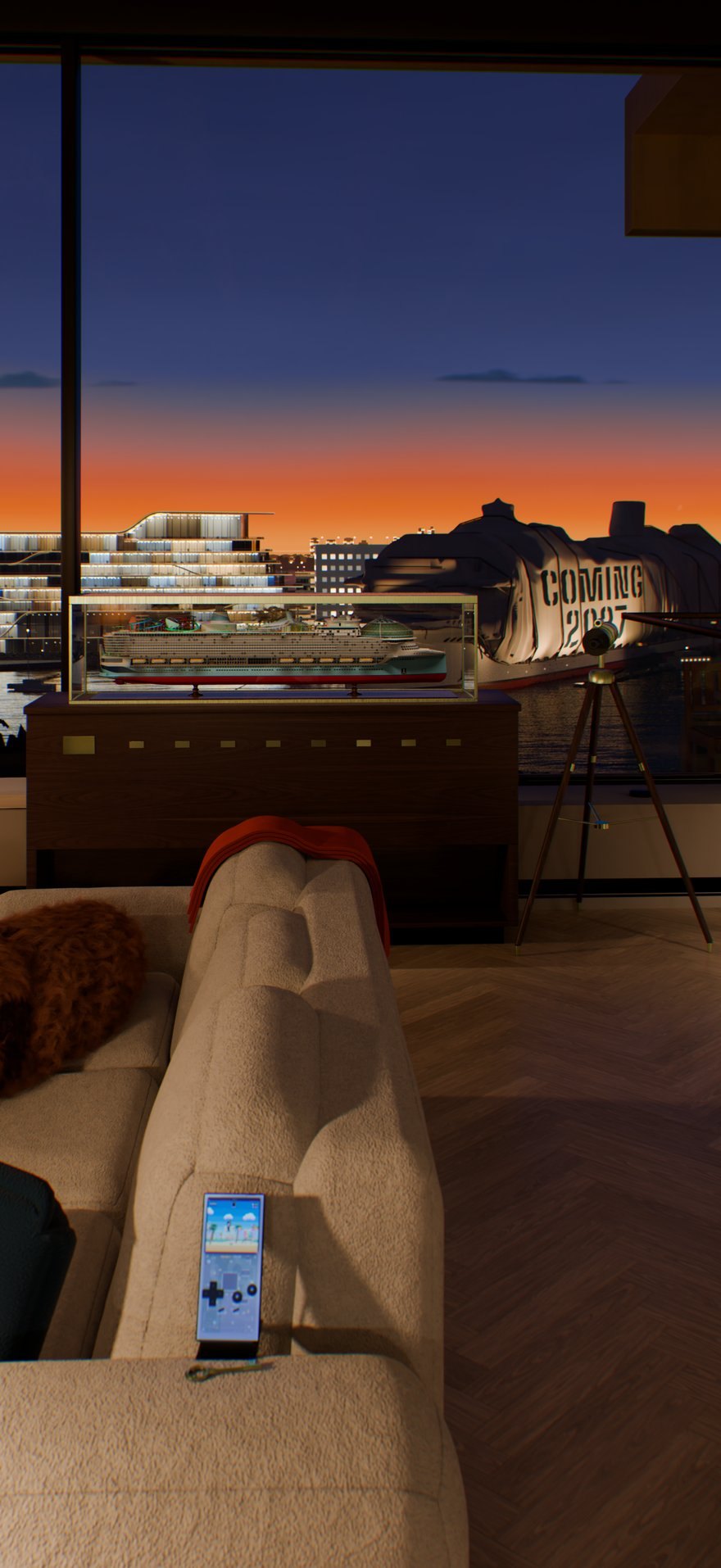
Instead of debating it in chat, the builder rendered a three-up contact sheet (true distance, closer, closest), and I picked from the pictures. We treated the bay the way a film production designer treats a soundstage backing: the beach skyline, the bridge, and the park stayed where they were so locals recognize home immediately, while the entire port island slid 220 meters closer to the glass. The headquarters building across the channel rotated slightly to face the window and scaled up by a third so its silhouette reads clearly on a vertical phone screen, kept clean of any corporate logos alongside unmarked white ships and one vessel wrapped in sailcloth stenciled COMING 2027.
Splitting Kelvin right at the window glass
Single-white-balance renders drove us crazy early on. Balance the virtual camera at 3300 K so the indoor wood slats and lamps feel warm, and the Miami twilight outside turns into muddy orange soup. Balance at 4700 K so the bay water and dusk sky stay crisp, and the living room inside looks like a dentist's waiting room.
Rendering an exact alpha mask of the window panes solved it in one shot. Everything inside the glass grades at 3300 K; everything beyond the glass grades at 4700 K. Seeing that first split-graded frame come back was easily my favorite moment of the build. Suddenly the walnut, woven rug, plaster, and bay water all looked like themselves at the same time.
Outside the glass, a small Python sky rig computes four hours of Miami light: Afternoon, Afterglow, Twilight (where you land), and Late Night (which also kicks in when you tap the TV's Dog Mode). Blending sunset coral into night indigo in standard sRGB always leaves bruised neon purple bands in the middle, so we blend sky colors in perceptual OKLab space instead:
def _oklab(rgb_display):
    c = np.array([x / 12.92 if x <= 0.04045 else ((x + 0.055) / 1.055) ** 2.4 for x in rgb_display])
    M1 = np.array([[0.4122214708, 0.5363325363, 0.0514459929], ...])
    M2 = np.array([[0.2104542553, 0.7936177850, -0.0040720468], ...])
    return M2 @ np.cbrt(M1 @ c), M1, M2
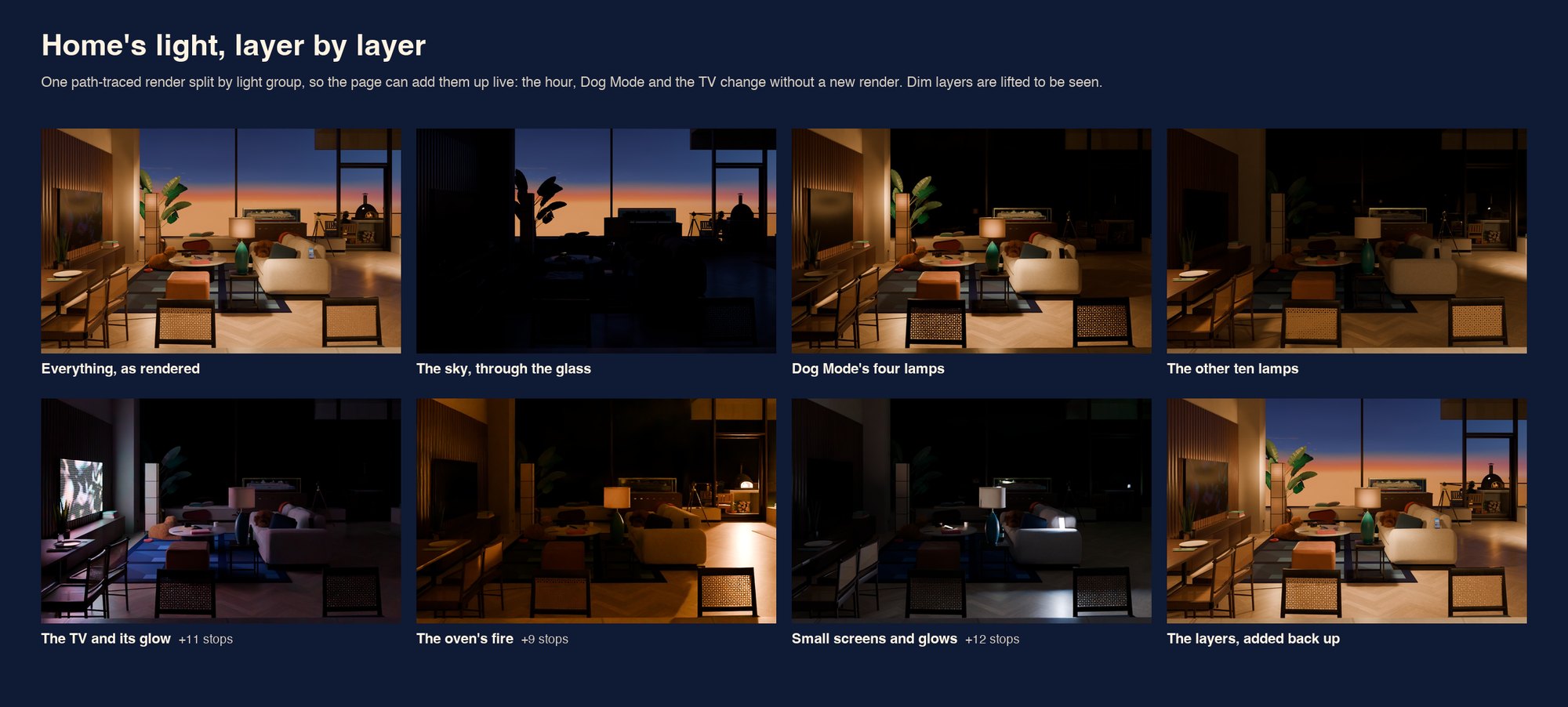
Because light is additive in linear space, the browser can remix individual light groups live without downloading a new scene. Drag the sliders to relight the room:
Catching 3D shortcuts on a phone screen
Procedural 3D written in blind Python rarely nails proportions on take one. Getting the curved glass building across the channel right took twelve rounds between builder and critics.
In an early round, the builder traced floor lines from a street-level reference angle and accidentally baked camera perspective straight into the concrete slabs, making every floor droop downward by up to 2.5 meters at the ends. Pinch-zooming on my phone caught the sag right away. Later, squinting at an Afternoon test frame, the floor-to-ceiling windows looked strangely dead, so I asked: "shouldn't the glass actually reflect the environment and not you just coloring the glass? making sure". To the lead's credit, it owned up immediately that the daytime glass had been partly tinted as a shader shortcut, ripped it out, and rebuilt real Cycles reflections. You don't have to be a graphics programmer to spot when glass stops acting like glass; you just have to care enough to zoom in and ask.
Why path-traced stills beat live WebGL here
Our original plan copied standard 3D portfolio architecture: bake lightmaps onto texture atlases and ship a live Three.js scene to the phone.
The second I refused to dumb down the ceiling slats, glass reflections, and fabric textures for mobile GPUs, live WebGL stopped fitting the job. Pushing megabytes of meshes and lightmaps into LinkedIn's embedded browser drains battery, cooks the phone, and leaves visitors staring at a loading bar.
Before committing to days of rendering, we spun up a tiny phone test page that crossfaded pre-rendered light passes in 2.5 seconds. Feeling how instant and cool-running it was on an iPhone settled the architecture on the spot. Blender does the heavy ray-tracing math once: rendering 10-bit AVIF stills (with JPEG fallbacks) in dedicated wide desktop and tall portrait phone framings across every station and lighting hour, plus short H.264 transitions for the 1.2-second camera glides between props. We traded away free-look mouse orbiting, and in return every pixel on your phone has true bounce light, your GPU draws zero triangles at rest, and every word of copy stays real, crisp HTML over the frame.
Saving 856 KB per photo by pulling out the film grain
Two small tricks kept the mobile first view under budget:
First, image encoders hate film grain because random high-frequency noise refuses to compress. With grain baked into a phone render, keeping the room sharp cost 954 KB per image; squeezing it down to 170 KB turned wood grain to mush. Exporting clean, grain-free renders from Cycles dropped that exact same phone frame to 98 KB, and a tiny shader pass lays one crisp monochrome grain layer back over the decoded photo in the browser:
Second, there's no loading spinner. About half a kilobyte of blurred preview data rides inline inside the initial HTML response, painting warm twilight colors on the very first network round trip before sharpening cleanly in place. Total phone first view lands around 218 KB against our 450 KB ceiling, and older devices or Save-Data browsers skip the room assets entirely and land straight on the fast /resume reading edition.
Sixty-five gigabytes of masters and automated eye checks
The full master set comes out to 136 path-traced stills and 42 camera clips, roughly 65 GB on disk rendered on my Mac overnight (made longer by me breaking my own design freeze to slide the wrapped 2027 ship 260 meters down the pier to a cleaner berth).
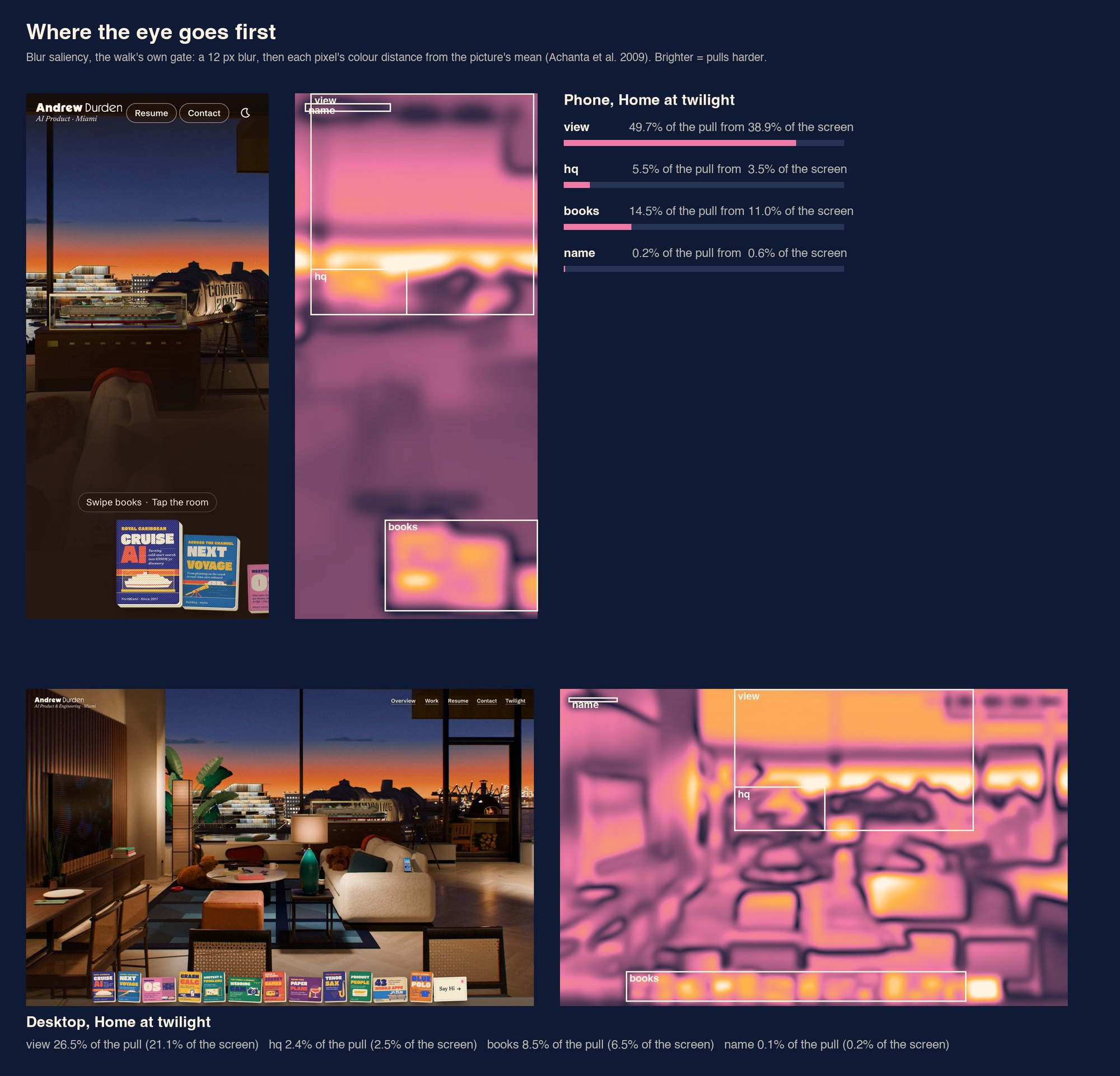
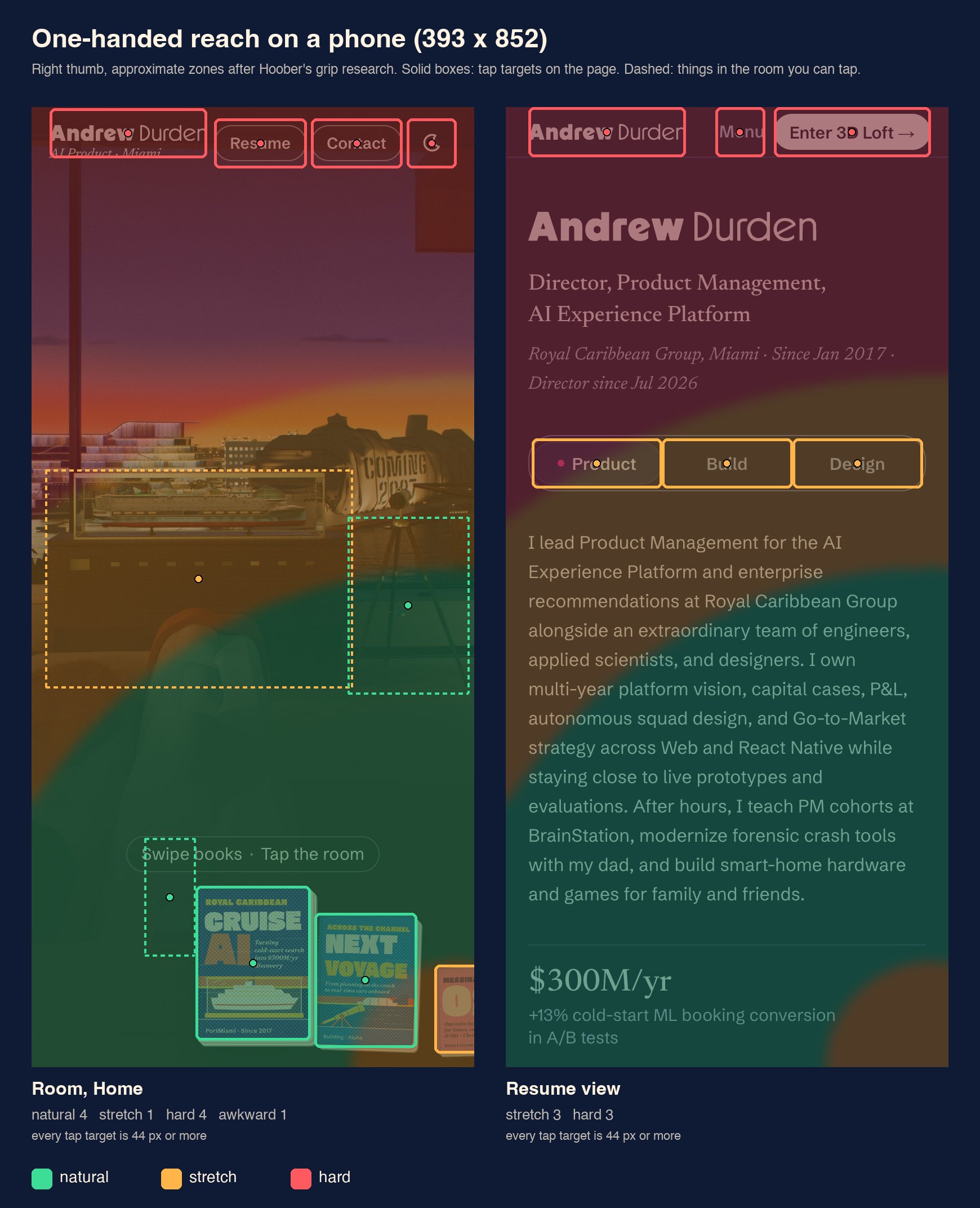
Before any batch goes live, an automated Playwright walk checks both phone and desktop viewports for the stuff human eyes miss at 1:00 AM: 3:1 text contrast across all four hours of daylight, zero clipped card lines, 44-pixel minimum tap targets, thumb-zone ergonomics, and a 12-pixel blur saliency check confirming the harbor view out the window pulls your eye before the book shelf at the bottom.
Getting photorealism onto a phone over cell data didn't come from cramming a heavier 3D engine into mobile Safari. It came from being ruthless about what the phone shouldn't have to compute in the first place.